

How to Take a Virtual Apartment Tour in 2026
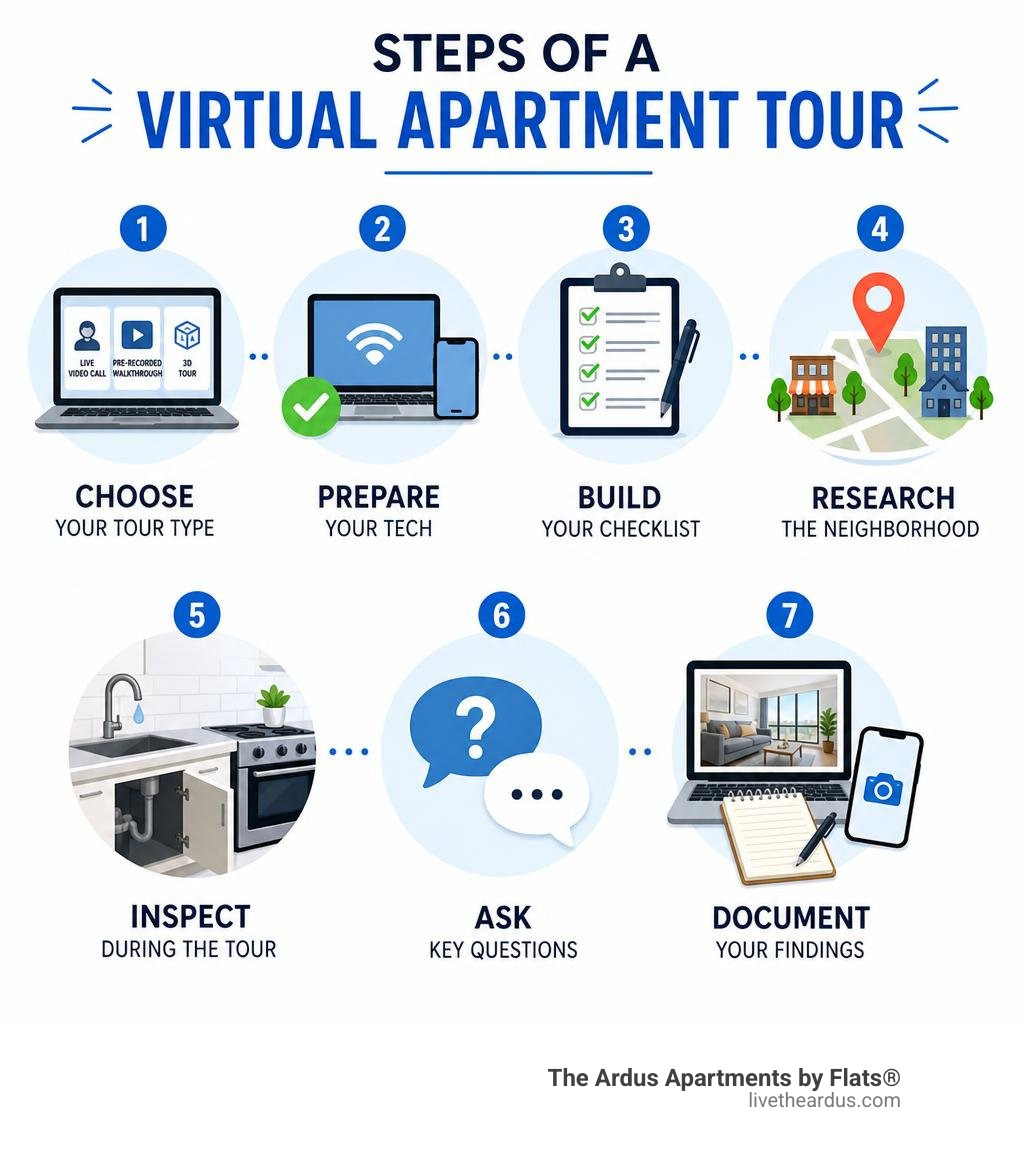
How to take a virtual apartment tour is easier than most renters expect — and faster too. Here's a quick overview of the process:
- Choose your tour type — live video call, pre-recorded walkthrough, or 3D interactive tour
- Prepare your tech — reliable internet, a compatible device, and tested video call software
- Build your checklist — layout, lighting, storage, appliances, and amenities
- Research the neighborhood — use Google Maps and Walk Score before the tour
- Inspect during the tour — ask the agent to test faucets, open cabinets, and demo appliances
- Ask key questions — utilities, maintenance, lease terms, and pet policies
- Document everything — take screenshots, notes, and follow up by email
Apartment hunting used to mean clearing your weekend schedule, fighting traffic, and rushing through back-to-back showings. Not anymore.
In 2026, virtual apartment tours are the norm — not the exception. Rental listings with virtual tours receive 87% more views than those without, and 61% of renters wish more listings included 3D walkthroughs. The demand is real, and the technology has caught up.
Whether you're relocating to a new city, squeezing a tour into a lunch break, or simply want to shortlist apartments before committing to in-person visits, virtual tours give you a genuine, detailed look at a space — without leaving your couch.
The key is knowing how to use them well. A passive scroll through a pre-recorded video is very different from an active, question-driven live tour that uncovers everything you need to know before signing a lease.
This guide walks you through all seven steps — from setting up your tech to documenting your findings — so you can tour smarter and decide with confidence.
Understanding Virtual Apartment Tours and How They Work
Before we dive into the steps, it helps to understand exactly what we mean when we talk about virtual tours. A virtual apartment tour is a digital walkthrough that allows you to explore a rental property remotely using your smartphone, tablet, or computer.
Depending on the property and your schedule, you will typically encounter three distinct formats:
- Live Video Tours: This is a real-time walkthrough where a leasing agent or landlord walks through the actual apartment while on a video call with you (using FaceTime, Zoom, or Google Meet). This is highly interactive, allowing you to ask the agent to open specific closets, test the water pressure, or zoom in on the finishes.
- Pre-recorded Video Walkthroughs: These are first-person, narrated videos of the unit or community. They are great for getting a general feel for the layout and flow of the space at any time of day, though they lack real-time interaction.
- 3D Interactive Tours: Powered by advanced scanning software like Matterport, these tours allow you to guide yourself through a 360-degree digital rendering of the apartment. You can click from room to room, look up at the ceilings, and peer down hallways at your own pace.

Many modern properties use LIDAR scanners to map out these spaces, ensuring that what you see online matches the real-world layout. To get a better grasp of the differences and decide which format fits your search, you can read our detailed breakdown of How Do Virtual Apartment Tours Work? and explore our comprehensive Virtual Apartment Tour Guide.
For those looking for a highly immersive experience, understanding What is A Virtual Apartment Tour? How to Simply Create One [2026] [2026] can show you just how detailed this technology has become.
How to Take a Virtual Apartment Tour: Preparation and Technology
Taking a successful virtual tour requires a bit of prep work. If you treat a virtual tour as a passive viewing experience, you might miss minor details that impact your daily comfort. Proper preparation ensures you ask the right questions and evaluate the space with a critical eye.
To make the most of your digital appointment, check out our Virtual Apartment Tour Complete Guide to build a solid game plan before you connect with a leasing agent.

Step 1: Set Up Your Tech to Take a Virtual Apartment Tour
There is nothing more frustrating than a video call that cuts out right as you are trying to view the closet space. To prevent technical hiccups, run through this quick tech checklist a few minutes before your tour:
- Check Your Connection: Ensure you are connected to high-speed Wi-Fi or have a strong cellular signal.
- Test Your Software: If the leasing agent sent a link for Zoom, Microsoft Teams, or Google Meet, download the app beforehand and test your microphone and camera.
- Charge Your Device: Live video calls drain battery power quickly. Make sure your laptop, tablet, or phone is fully charged or plugged in.
- Find a Quiet Space: Sit in a quiet room with minimal background noise so you can easily hear the agent's descriptions and ask your questions clearly.
For more technical preparation details and software suggestions, read our Virtual Apartment Tours Tips 2025 to ensure your session runs smoothly.
Step 2: Research the Surrounding Area and Neighborhood
A beautiful apartment is only half of the equation; you also need to love where you live. Since a virtual tour won't let you physically walk the block, you have to do some digital detective work beforehand:
- Map the Address: Drop the building's address into Google Maps. Use the Street View feature to virtually walk up and down the street. Look at the neighboring buildings, the cleanliness of the sidewalks, and the overall feel of the block.
- Calculate Your Commute: Drop in your office address or frequent destinations to see transit times, driving routes, and nearby train or bus stops.
- Check the Walk Score: Use online tools to verify the area's walkability and see what grocery stores, coffee shops, and restaurants are within walking distance. For example, if you are looking at apartments in River North, Chicago, you'll want to verify how close you are to transit lines like the Brown or Red Line.
Doing this preliminary research allows you to focus entirely on the interior details once the virtual tour begins.
What to Look for Inside the Unit and Building
Once the tour starts—whether you are clicking through a 3D interface or talking to a live leasing agent—it is easy to get distracted by stylish staging or impressive city views. To keep your search objective, you need to know exactly what to look for inside the unit.
Using resources like our Apartments 3D Tours Guide can help you keep your eyes on the most important physical aspects of the space.
Step 3: Evaluate Layout, Finishes, and Natural Lighting
When viewing a home through a camera lens, spatial dimensions can be deceptive. Wide-angle lenses are frequently used in real estate photography and video tours, which can make a compact bedroom look like a grand suite.
- Analyze the Layout Flow: Pay attention to how the rooms connect. Is the bathroom easily accessible from the bedroom? Does the front door open directly into the living space, or is there a dedicated entryway?
- Check the Finishes: Look closely at the flooring transition between rooms. Is the hardwood or modern laminate consistent throughout, or are there mismatched transitions? Ask the agent to zoom in on the paint job to check for uneven coats, scuffs, or signs of water damage on the ceiling.
- Assess Natural Light: Ask which direction the windows face. South- and west-facing windows will bring in plenty of afternoon sun, while north-facing windows offer more consistent, cooler light. Have the agent turn off the overhead lights for a moment so you can see how much natural light the space actually receives.
For a deeper dive into spatial visualization, reviewing an Apartment 3D Model can help you understand the relationship between different rooms and window placements.
Step 4: Inspect Kitchen Appliances and Bathroom Fixtures
The kitchen and bathroom are the most high-use areas of any home, making them critical focal points during your virtual walkthrough.
- Appliance Functionality: Ask the agent how old the appliances are. If it is a live video tour, don't hesitate to ask them to open the refrigerator, freezer, and oven doors. This gives you a clear sense of their storage capacity and cleanliness.
- Cabinet and Counter Space: Have the agent open several kitchen cabinets so you can see the depth of the shelves. Note whether there is enough counter space for your small appliances like coffee makers or blenders.
- Test the Plumbing: This is a step many renters overlook. Ask the agent to turn on the kitchen and bathroom faucets to demonstrate the water pressure and how quickly the water heats up. Have them flush the toilet to ensure the plumbing operates properly.
For practical examples of what to ask the agent to test during a video walkthrough, check out our Apartment Video Tour tips. You can also find excellent step-by-step testing checklists in Virtual Apartment Tour: 20 Essential Tips | Redfin .
Step 5: Tour the Shared Spaces and Community Amenities
A virtual tour of an apartment shouldn’t stop at the deadbolt of your front door. The building's common areas play a huge role in your daily life, so make sure they are included in your virtual tour:
- Hallways and Mailrooms: Are the hallways clean, well-lit, and wide enough for moving furniture? Where are packages delivered, and is there a secure package locker system?
- Shared Amenities: Ask to see the resident lounge, fitness center, or rooftop terrace. If you are touring a historic warehouse conversion—like the stylish loft-style properties found in Chicago's River North—check how the historic charm blends with modern amenities.
- Security and Access Control: Look at the building entry systems. Are there security cameras in the lobby? Does the building use key fobs, smartphone access, or call boxes for guest entry?
- Parking and Trash Areas: Ask to see the parking garage or lot to understand the layout. Don't forget to ask where the trash chutes or recycling bins are located on your floor.
To learn more about what to look for in common areas of high-end buildings, read our Luxury Apartment Virtual Tour Ultimate Guide.
Step 6: Ask Key Questions About Utilities, Maintenance, and Pet Policies
While the visual tour is crucial, some of the most important apartment details cannot be seen. Use the live tour or your follow-up email to clarify these operational policies:
- Utilities: Which utility bills are your responsibility, and which are covered by the building? Ask about the internet and cable providers servicing the building to ensure your preferred provider is available.
- Maintenance Requests: How do residents submit maintenance requests? Is there an on-site maintenance team, and how are after-hours emergency repairs handled?
- Pet Policies: If you have pets, ask about the building's specific rules. Many properties have a strict two-pet limit per apartment and require pet screening. Make sure to ask about any pet-related amenities, such as on-site dog runs or washing stations.
- Lease Terms: Clarify the lease start date, lease length options, and the move-in process.
For a complete list of questions to keep on hand during your call, refer back to our Virtual Apartment Tour Complete Guide or read the highly practical suggestions in Maximize Your Virtual Apartment Tour Experience | ApartmentSearch .
Overcoming Limitations and Finalizing Your Decision
As convenient as virtual tours are, they do have natural limitations. You cannot physically smell the hallways for pet odors or cigarette smoke, nor can you hear if the walls are thin or if street noise is loud.
Recognizing these boundaries helps you take steps to verify the apartment's actual living conditions before signing a lease.
| Feature | Virtual Apartment Tour | In-Person Apartment Visit |
|---|---|---|
| Convenience | High (Tour from anywhere, anytime) | Low (Requires travel and scheduling) |
| Time Commitment | Low (Takes 10–15 minutes) | High (Often takes several hours) |
| Spatial Scale | Moderate (Wide-angle lenses can distort sizes) | High (Accurate sense of space) |
| Sensory Details | None (Cannot check smells, minor sounds) | High (Can hear transit, check plumbing firsthand) |
| Furniture Planning | High (3D tours offer digital measuring tools) | Moderate (Requires physical tape measure) |
Step 7: How to Take a Virtual Apartment Tour and Document Your Findings
Because you might be touring multiple properties virtually in a single afternoon, the details can quickly blur together. Proper documentation is key to making an informed final decision:
- Take Screenshots: During a live video call or a 3D interactive tour, take screenshots of any specific features you love, as well as areas of concern (like a scuffed floor or a tight kitchen corner).
- Keep Detailed Notes: Write down your immediate impressions of each room. Note things like the layout flow, window views, and how helpful the leasing agent was.
- Follow Up by Email: Immediately after the tour, send a follow-up email to the leasing agent. Thank them for their time and ask them to confirm any details discussed during the call in writing. If there were areas of the apartment that were blurry or missed during the tour, ask them to send high-resolution photos of those specific spots.
To make sure you don't miss a single detail during your review, utilize our 3D Apartment Tour Complete Guide to organize your photos, screenshots, and notes effectively.
Frequently Asked Questions about Virtual Apartment Tours
Can a 3D tour completely replace an in-person visit?
While a 3D tour is an exceptional screening tool that can save you hours of travel, it is best used to narrow down your options. If you are relocating from out of state and cannot visit in person, a highly interactive live video tour is your next best option.
However, if you are local, we recommend scheduling an in-person visit for your top two or three choices before signing a lease to verify the sensory elements of the space. For more tips on what to look for when evaluating digital tours versus real-world spaces, refer to our comprehensive Virtual Apartment Tour Guide.
How accurate are the measurements in a 3D apartment tour?
Most modern 3D tours created with professional cameras (like Matterport) are incredibly accurate. They utilize laser-scanned data to capture thousands of data points, meaning the built-in measurement tools typically maintain a ±1% tolerance. This allows you to measure walls, doorways, and alcoves to plan your furniture layout with high confidence.
To learn how to use these virtual measuring tapes, check out our guide on 3D Apartment Tour Matterport or read How to Take a Virtual Apartment Tour .
What are the red flags to watch out for during a virtual tour?
When touring virtually, look out for these common warning signs:
- Missing Rooms: If the 3D tour or walkthrough video skips a closet, bathroom, or laundry room, ask the agent why. They might be hiding damage or outdated finishes.
- Outdated Footage: Look for clues like seasonal items outside or old decor. If the tour looks like it was filmed years ago, ask the agent to verify that the unit is still in the same condition.
- Extreme Urgency or Scams: If a landlord or agent pressures you to sign a lease or send money immediately without offering a live video call of the actual unit, proceed with caution. Always verify that you are dealing with an established property management company.
For more security tips, read our Virtual Apartment Tour Complete Guide to protect yourself from rental scams.
Conclusion
Mastering how to take a virtual apartment tour gives you a massive advantage in today's rental market. By preparing your technology, doing your neighborhood research, and asking detailed, practical questions, you can confidently secure your next home from anywhere in the world.
If you are looking for modern living in Chicago, IL, we invite you to experience the perfect blend of historic warehouse charm and contemporary style. At The Ardus Apartments by Flats®, located in the vibrant River North neighborhood, we offer beautifully designed apartments featuring unique amenities like a stunning rooftop lounge and an on-site coffee shop.
Ready to find your next home? Explore our available floor plans and experience our immersive Virtual Tours today!